What Is OMI AI Callbot? Detailed Features and Usage Guide
Reading time: 10 minutes
What is OMI AI Callbot? What are its detailed components, and how can it be used for optimal results?
The Context Behind OMI AI Callbot
In the Industry 4.0 era, developing services to reach a large customer base is essential for business expansion. There are three primary methods for achieving this:
In-house sales team: Staff members call a list of potential customers. Maintaining a large workforce is necessary to ensure sufficient reach.
Outsourced telesales team: This approach helps save on personnel costs and optimizes resource allocation.
Notably, the use of virtual assistants is increasingly becoming a superior choice for businesses looking to expand their reach and boost sales efficiency.
Using a Virtual Assistant (Callbot): Capable of making hundreds of thousands of calls daily with consistent quality. It effectively manages interactions and gathers necessary information from customers.
What specific technologies power OMI AI Callbot?
OMI AI Callbot incorporates a range of specialized technologies developed by a team of over 60 engineers at VIHAT Group.
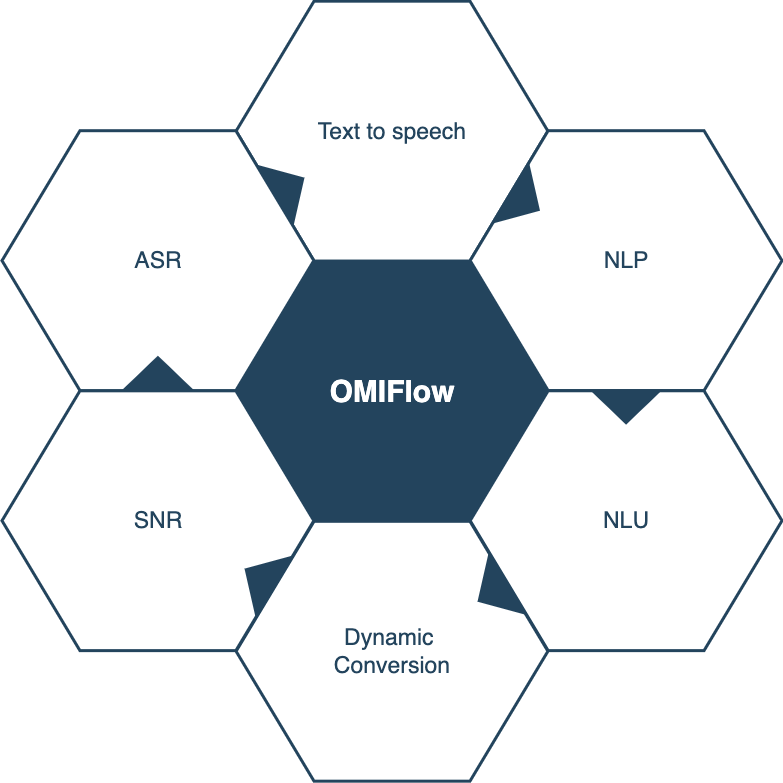
What are the key technologies behind OMI AI Callbot?
ASR
One of the system’s most critical components is the ASR (Automatic Speech Recognition) module—the technology that converts audio into language.
The system has been trained on over 2,000 hours of speech, ensuring it can recognize and distinguish accents from Vietnam’s three main regions: North, Central, and South.
Text-to-Speech
This system is designed to convert text into speech, with the primary challenge being to ensure the training data meets call center requirements. The goal is to produce a friendly, smooth, and natural-sounding voice with authentic intonation. ViHAT has approached this process rigorously, achieving excellent results in creating a realistic and engaging voice.
NLP
The language analysis module effectively processes the Vietnamese language. It parses semantics and phrases within the text, enabling a clear understanding of the text’s structure and content.
NLU
This module identifies the meaning of a conversation segment and recognizes the data that needs to be collected so the bot can respond accurately.
For example, when the bot asks: “May I take a moment of your time to survey you on the service quality of VIHAT Group?” the customer might agree or decline. The bot needs to determine whether the customer’s intent is to agree or refuse.
The NLU (Natural Language Understanding) module analyzes and interprets the customer’s intent from their response, ensuring the bot can provide an appropriate reply.
Dynamic Conversion
This enables the creation of a conversation script that is natural, seamless, and as context-rich as possible.
Getting to Know OMI AI Callbot
What are the implementation stages for OMI AI Callbot?
Bot Training
- Objective: To enable the bot to understand and accurately respond to user inputs.
- Method: Provide comprehensive data to train the bot to become “smart” and accurately recognize responses.
- Data requirements: Typically, a bot requires more than 20 lines of data to begin understanding user intent. For complex intents—such as identifying full names—over 1,000 lines of data may be required.
Developing a scenario
- Objective: Clearly define the necessary script and potential scenarios within the conversation.
- Method: Outline a detailed script covering all foreseeable situations. Ensure the script comprehensively addresses the context and conversational logic.

- Sample script
Create a campaign
- Objective: Conduct calls based on the established script.
- Method: Compile a list of target customers. Execute calls following the pre-determined and previously trained script.
Key concepts to understand on OMI
BOT Training
Intent / Desire:
To enable the bot to understand and respond appropriately to customers, it must be able to recognize the meaning of utterances in specific situations. Providing the bot with a set of synonymous phrases for each intent helps it learn to recognize similar sentences and infer the customer’s intent.
Examples:
Customer agrees.
Customer is busy.
Customer has purchased the product.
Customer wants a colon examination.
Objects / Entities:
Specific data can be identified from a sentence or conversation. Extracting key entities allows the bot to understand the context.
Example: In the sentence “Please come see me tomorrow at 3 PM,” the intent is an appointment, and the time entity is 3 PM tomorrow.
Training does not require providing every possible phrase a customer might use. Instead, providing a sufficiently representative dataset is enough; the AI bot uses Deep Learning algorithms to infer and interpret the meaning of other utterances on its own.
Scenario
Spoken Text
Text for the bot to read aloud to the user; this can be customized based on the specific customer.
Example: “Hello, Mr. {{name}}.” If the customer’s name is Viet, the bot will say, “Hello, Mr. Viet.”
Action
A single action or a group of actions performed by the bot.
Examples: Adding a new customer, updating customer information, creating notifications, setting reminders, creating tickets, or forwarding calls.
Condition
The backbone of OMIFlow, enabling branching based on customer data (tags, groups, comparable attributes), collected data, or third-party data via API.
Marketing
Actions that support customer outreach, such as sending SMS or ZNS messages to verify specific information.
Information Collection
A node allowing the scenario creator to…thu thập thông tin khách hàng nhằm mục đích trích xuất hoặc lưu trữ thông tin.
- Collect information such as full name, phone number, and address.
- Use this data as a comparison criterion for subsequent steps in the workflow. For example: after collecting the address, execute a marketing action—if the customer is located in Ho Chi Minh City, send voucher details via SMS.
Calling Campaigns
Calling campaigns consist of outbound calls made to customers based on pre-trained scripts.
Campaign Configuration:
During the campaign setup process, you can customize and configure various key details, including:
- Voiceover: Select a voice suitable for each customer segment.
- Call allocation ratio: Determine the call distribution ratio for different customer groups.
- Campaign scheduling: Set specific start and end times for the campaign to ensure calls are made at the most appropriate moments.
- Target audience: Select and segment target customers.
Post-campaign report
Upon completion of the campaign, the system provides a detailed report containing: call data, call results, collected data, and conversation transcripts.
This information helps evaluate campaign effectiveness and refine future scripts.
What is the training process for the OMI AI Callbot?

Bot Training
Enter “Customer statement or issue” content
This field allows us to input the data needed to train the bot. The entered data corresponds to the user statements that we want the bot to recognize and understand.

Customer states the issue
Select the “Intent / Desire” topic
As you type in the content field, the bot automatically suggests the corresponding data type. If a new “Intent” needs to be trained, you can add it directly from the selection interface.
Select the “Object / Entity”
Objects/Entities are elements extracted from the customer’s statement; each carries a specific value.
Each object/entity has a primary classification—its keyword—defined upon creation. If more granular classification is required, new codes can be added to diversify the training data.
Example: Statement: “I want to go from Hanoi to Ho Chi Minh City.”
A location appears twice in this sentence. Hanoi is the “Departure Point,” and Ho Chi Minh City is the “Destination.”
Each object/entity identified in the sentence is assigned a data type, which is used for comparison within scenario conditions later on.
- Boolean: True/false data.
- String: A sequence of arbitrary characters.
- Number: Numeric data that can be compared as greater than or less than.
Using objects/entities helps the bot better understand the context of an utterance and provide accurate responses based on conditions defined in the scenario.
Creating a scenario
General configuration
What is the general configuration for OMI AI Callbot?

What is the general configuration for the OMI AI Callbot?
Script Information
The script information section allows you to configure the script’s name and type. For voice authentication scripts, there are two options:
Authentication Registration Script
An automated call session using this script saves the customer’s voiceprint to the profile linked to their phone number. Subsequently, whenever the business interacts with that number—whether via a standard call or an automated call using an authentication script—the system verifies and indicates whether the person answering is the previously authenticated customer (voice-based identification).
Authentication Script
An automated call session using this script utilizes the voiceprint previously captured via the authentication registration script. The system compares the voice of the person answering the call against the stored voiceprint to verify their identity.
Variable List
The system provides a detailed list of variables used in this script, enabling effective tracking and management.
Collected Data
The system provides a detailed list of variables collected and used in this script, allowing you to modify variable names directly from the management interface.
Script Configuration
Within the script, components are referred to as “nodes” and are categorized as follows:
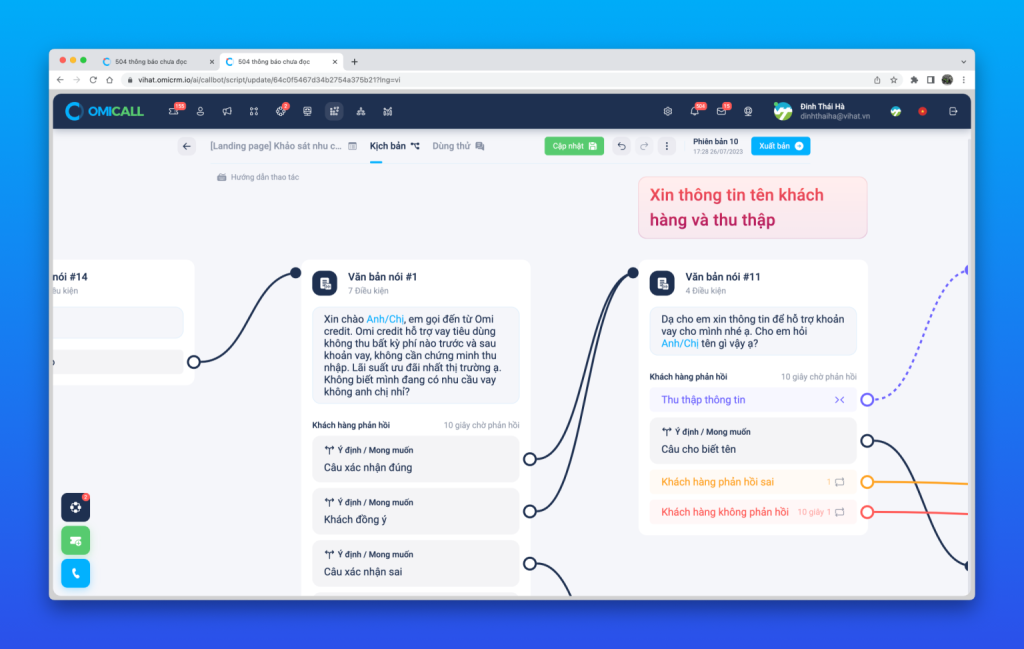
Script Configuration
Delay
Pauses the script for a set duration before proceeding to the next nodes.
Note: Unlike the Delay node in campaigns, in a Callbot script, the call terminates upon reaching this node, yet subsequent events are still executed according to the configuration.
Spoken Text
Content read aloud by the BOT to the customer based on the entered text.
Condition
Compares customer attributes or analyzed data to route the script along different branches.
Action
Executes actions linked to other CRM functions, such as adding new customers, updating customer information, creating tickets, or setting reminders.
Marketing
Interacts with customers via channels such as SMS, Email, or ZNS.
Data Collection
Collects data from the call to save into predefined attributes.
Note
Allows the script creator to add notes at specific nodes to explain or distinguish between groups of events within the script.
Create Callbot Campaign
Create a campaign manually

Create a manual campaign
Step 1: Select a CallBot script
Choose the CallBot script you previously created to use in the campaign.
Step 2: Select a voice
Choose a suitable voice for the bot. You can preview and listen to the available voices to select the best fit.
Step 3: Add customers to the campaign
Add a customer list to the CallBot campaign. This process is similar to creating other automated campaigns, such as automated calls, SMS, or ZNS.
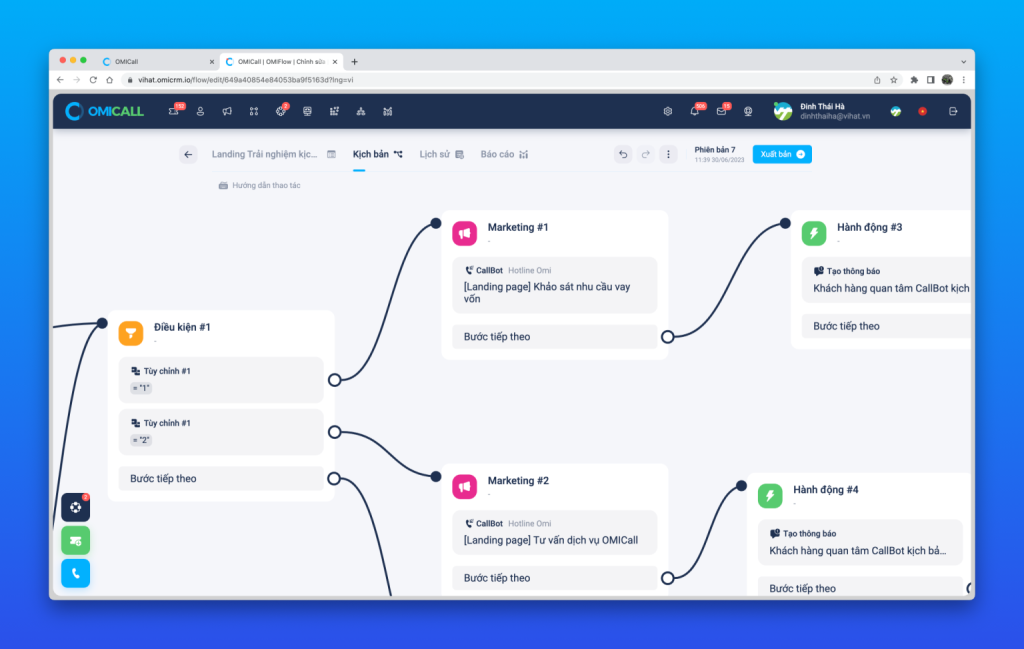
Creating a CallBot Campaign with OMIFlow
In the OMIFlow scenario, you can add “Marketing” and “CallBot” nodes. Then, configure them as follows:
Step 1: Select the previously created CallBot scenario.
Step 2: Select the voice.
Step 3: Select the customer (if already imported into OMIFlow) or enter a custom phone number.
Conclusion
In summary, what is OMI AI Callbot? It is an advanced solution that helps businesses enhance the quality of customer communication and interaction while saving time and costs. Experience OMI AI Callbot to discover its outstanding benefits.
For more information, please contact:
VIHAT TECHNOLOGY Co., Ltd
Headquarters: ViHAT Building – 06 Street No. 16 (Him Lam Residential Area) – Hiep Binh Chanh Ward – Thu Duc District – Ho Chi Minh City
Hanoi Branch: Floor 15, LADECO Building, 266 Doi Can, Ba Dinh, Hanoi
Cambodia Branch: Thida Rath #154 St. 33MC, Sangkat Steung Meanchey, Khan Mean Chey, Phnom Penh

-
 What is TikTok advertising? Advertising policies and how it works.
-
 Exploring Conceptual Selling – Understanding Modern Sales Trends Correctly
-
 What is a KOC? Distinguishing between KOLs and KOCs.
-
 What Are Customer Insights? Revealing How to Effectively Uncover Them
-
 What is Digital Marketing? 10 Effective Forms of Digital Marketing
-
 What is Online Marketing? Types of Online Marketing